Your marketing dashboard is lying to you. Not because the tool is bad, but because the data underneath it was never properly modeled.
You know the symptoms. ROAS in Looker Studio doesn’t match the number from Google Ads. “Paid Social” means something different in every report. Someone asks a simple question — what drove last month’s revenue? — and three analysts produce three answers.
These aren’t dashboard problems. They’re data modeling problems. And they’re exactly the kind of problems that Dataform, running natively inside BigQuery, is built to solve.
Why Dataform for marketing analytics
Dataform lives inside the Google Cloud Console. It’s BigQuery-native. There’s no external orchestrator to set up, no separate infrastructure to manage, no credentials dance to perform between your transformation layer and your warehouse.
That matters more than it sounds, especially for marketing analytics.
Most marketing data already lives in or flows through Google Cloud. GA4 exports land directly in BigQuery. Google Ads and Search Console data can be transferred through BigQuery Data Transfer Service. Even non-Google sources like Meta Ads can be easily ingested into BigQuery.
With Dataform, you write SQLX — essentially SQL with a thin templating layer — to transform all of that raw data in place.
- Dependencies between models are declared with
ref(). - Assertions catch data quality issues before they reach your dashboard.
- Incremental logic keeps costs down.
And because it’s integrated into BigQuery, you’re never context-switching between systems.
The result: Your entire marketing data pipeline — from raw platform exports to reporting-ready marts — lives in one environment, version-controlled in Git, and governed by one workflow.
The real problem: four platforms, four languages
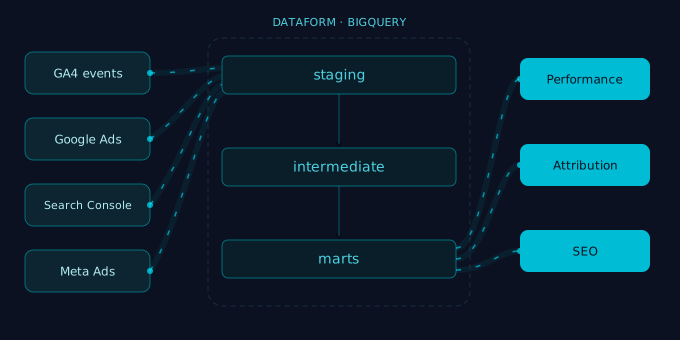
Here’s where it gets concrete. A typical marketing analytics setup pulls from at least four major sources, and each of them describes the world in its own way and slices the data differently.
GA4 gives you raw events — page views, purchases, scroll depth — exported as nested, repeated fields in BigQuery. There’s no concept of a “session” in the raw data; you have to build that yourself. Attribution is scattered across traffic source fields that may or may not be populated, depending on consent and configuration.
Google Ads provides campaign-level spend, clicks, impressions, and conversions — but “conversions” in Google Ads means whatever you configured as a conversion action, not necessarily what your business calls a conversion.
Google Search Console reports on organic search performance: impressions, clicks, position, and the queries that triggered them. It’s aggregated by page and query, with no user-level data. Useful for SEO analysis, but structurally nothing like your ads data.
Meta Ads (Facebook/Instagram) adds yet another schema: ad sets, campaigns, reach, frequency, and platform-specific conversion events that use different attribution windows than Google. Naming conventions rarely match what you use in Google Ads.
If you push all of this raw data straight into a dashboard, you don’t get insight. You get a mess.
The fix is a transformation layer that takes these four different schemas and translates them into a shared vocabulary. That’s what your Dataform project should do.
Three layers that actually work
The modeling pattern that works best in Dataform follows three layers. Not because three is a magic number, but because it creates a clear separation between source cleanup, business logic, and reporting output.
Staging: clean the source data
Staging models sit directly on top of your raw tables. They do the boring, essential work: renaming cryptic column names, casting types, flattening nested structures, and filtering out junk.
For GA4, this is where you unnest event parameters and turn the raw events_* export into something readable. If you’ve ever stared at GA4’s nested BigQuery schema and wondered where to start, ga4dataform.com is your go-to place. It’s an open-source Dataform package that handles the heavy lifting of GA4 event flattening, sessionization, and common transformations. We use it regularly as a starting point and build custom logic on top of it. It’s a great accelerator that saves you from reinventing the wheel on GA4’s notoriously awkward export format.
For Google Ads, it’s where you standardize date formats and pull campaign names into a consistent shape. For Search Console, it’s where you clean up URL formats. For Meta, it’s where you normalize campaign and ad set naming to match your internal conventions.
Staging models should stay close to the source. Their job is to make raw data accessible, not to make business decisions.
Example naming: stg_ga4__events, stg_google_ads__campaign_performance, stg_search_console__query_performance, stg_meta_ads__campaign_insights.
Intermediate: apply business logic
This is where the real modeling happens. Intermediate models take clean, staged data and apply the logic that your organization has agreed on.
Sessionization from GA4 events. Channel grouping that maps every source/medium/platform combination into a single, canonical taxonomy. “facebook / cpc” from GA4, “Meta Ads” from your Meta export, and “paid_social” from your internal tagging all resolve to the same channel. Cost allocation that joins ad spend from Google Ads and Meta back to traffic data from GA4. Landing page classification. Lead scoring rules. Attribution logic.
This is also where you join across sources for the first time. A model like int_marketing_cost_by_channel might combine Google Ads spend, Meta spend, and any other paid channel costs into one unified table at a consistent grain (e.g. date × channel × campaign).
The key discipline: Every business decision should be visible and documented here. When someone asks “how do we define a session?” or “what counts as Paid Social?”, the answer should be traceable to a specific intermediate model.
Marts: serve reporting
Marts are the tables your dashboards, notebooks, and stakeholders actually use. They should be wide, intuitive, and free of source-level complexity.
A good marketing mart might present one row per date per channel, with metrics like sessions, conversions, revenue, cost, ROAS, and CPA already calculated. A separate mart_seo_performance could combine Search Console query data with GA4 landing page sessions and conversions.
If your marts still contain raw field names from GA4 or require the dashboard user to understand which table has cost data and which has conversion data, the model isn’t finished.
Combining sources in practice
The most valuable part of a Dataform marketing model is where sources meet. Here’s what that looks like in practice.
Unified channel taxonomy
Create one intermediate model, e.g. int_channel_mapping, that defines your channel grouping logic. Every source feeds into it:
- GA4
source/medium→ mapped to your canonical channels - Google Ads campaign names → parsed and mapped
- Meta campaign naming conventions → parsed and mapped
- Search Console → always “Organic Search”
Downstream, every mart references this mapping. No dashboard ever invents its own definition of “Paid Social” or “Brand Search.”
Cost-to-traffic join
Google Ads and Meta give you cost. GA4 gives you sessions and conversions. Joining them requires a shared key — typically date + channel + campaign — and a conscious decision about how to handle mismatches, because the numbers will never align perfectly between platforms.
In Dataform, you build this join in an intermediate model, document the assumptions (e.g., “we attribute cost based on UTM campaign name matched to ad platform campaign name”), and let the mart consume the result. When assumptions change, you update one model — not twelve dashboards.
Blending organic and paid performance
Search Console data is uniquely useful because it shows you what queries your pages rank for and how often they’re clicked — data that GA4 doesn’t provide. But it’s aggregated differently.
An intermediate model can join Search Console page-level data with GA4 landing page sessions, giving you a combined view: organic impressions and clicks from GSC alongside engagement and conversion metrics from GA4. This is the kind of blended analysis that’s painful to do in a dashboard tool but straightforward in Dataform.
Incremental strategy for marketing data
Marketing datasets are large and late. GA4 alone can generate millions of events per day for a mid-size site. Google Ads cost corrections arrive after the fact. Meta attribution windows can shift conversion credit days later.
Dataform supports incremental models natively. You define a uniqueKey for upsert behavior and filter on a partition or timestamp to limit what gets processed in each run.
But “incremental” is not one-size-fits-all. For GA4, partition-based replacement — where you drop and rebuild the last n days — is often more reliable than row-level merges, because late-arriving events can modify existing records. For cost data from Google Ads or Meta, a merge on date + campaign is usually sufficient since corrections are less frequent.
Add a lookback window of approximately 3 days to absorb the most common delays. Schedule periodic full refreshes for the models where drift accumulates.
Operational habits that make it last
A good Dataform project is also a well-operated project.
Use workspace isolation. Dataform’s ${workspaceName} suffix lets you develop in your own schema without touching production. Use it. Every time.
Treat Git as the source of truth. Merging to the default branch is not deploying. Configure release configurations and scheduled pipelines so that production only updates through a deliberate, tested flow.
Write assertions, not just models. Dataform assertions are your safety net. It sounds boring, but it saves you a lot of time once something breaks, stakeholders start asking questions, and you spend your afternoon debugging the issue. Assert that your staging models have no null keys. Assert that your channel mapping covers all known source/medium combinations. Assert that your cost table has no negative values. These checks run with your pipeline and catch problems before they reach the dashboard.
Document in the SQLX files. Dataform supports table and column descriptions directly in your model definitions. Use them. When someone new joins the team and opens mart_marketing_performance, the column descriptions should tell them exactly what “attributed_revenue” means without having to trace it through five upstream queries.
What good looks like
A well-built Dataform marketing model makes certain questions boring to answer — and that’s the point.
What counts as a session? Defined in int_ga4_sessions, documented, assertion-tested.
What channel does this campaign belong to? Look at int_channel_mapping. One source of truth, used everywhere.
Why doesn’t ROAS match between the dashboard and Google Ads? Because the mart uses a unified cost model with documented assumptions, and Google Ads reports its own self-attributed conversions. The difference is expected and explained.
Can we add TikTok data next quarter? Yes — add a staging model, extend the channel mapping, and the marts absorb it without a rewrite.
That’s what a robust model gives you. Not perfection — marketing data is inherently messy — but a system where the logic is explicit, testable, and designed to evolve.
Still debugging dashboards?
Do you want a marketing model your team won’t outgrow? We design Dataform pipelines on BigQuery that stay reliable as your sources, channels, and questions evolve. Reach out to us and see how we can take a leap with your existing data stack.